Shipped · Workflow automation 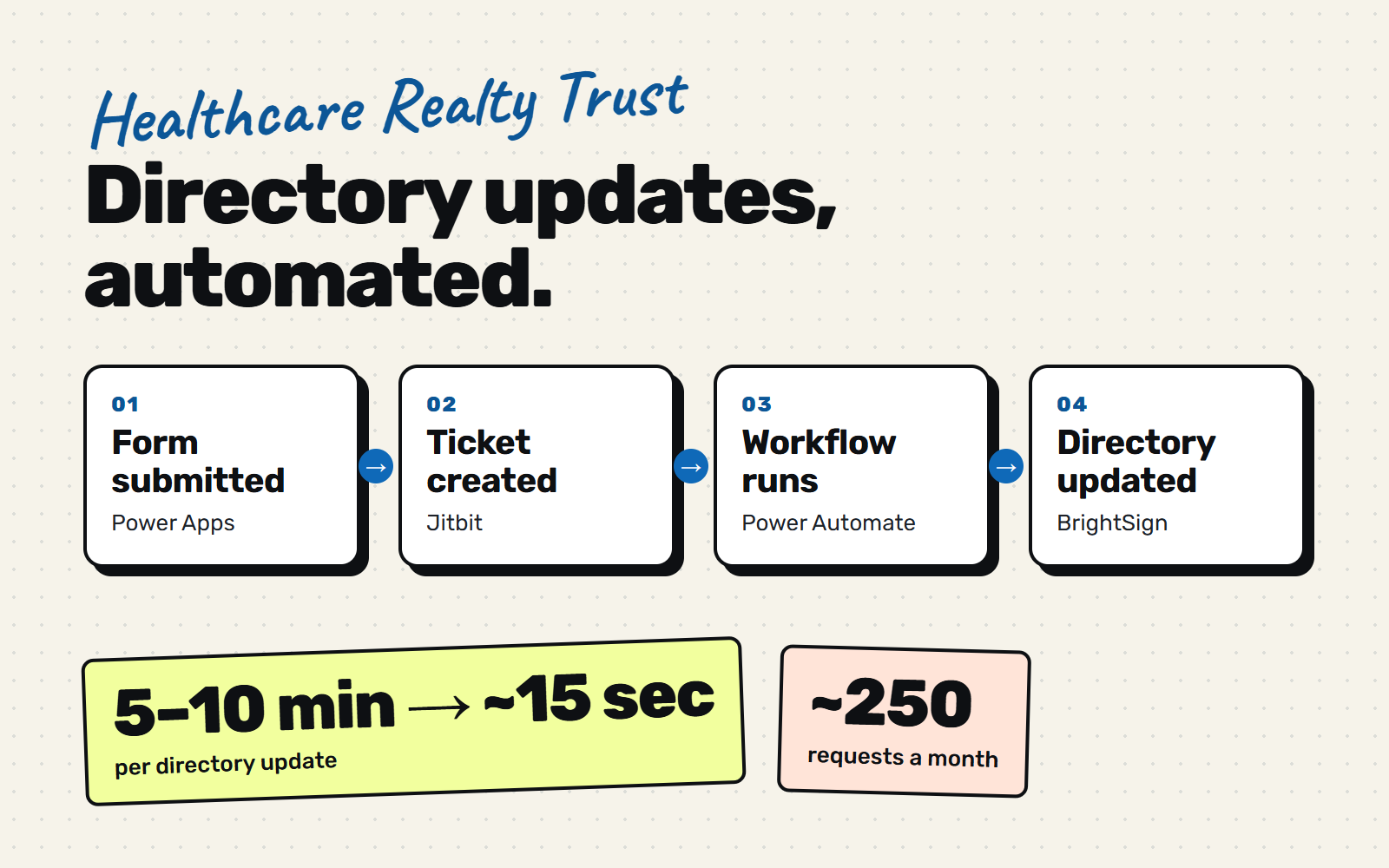
Directory Updates, Automated
Impact overview
~15 secto update a directory, down from 5–10 minutes.
~250directory requests come in each month.
17–40 hrsof technician time saved each month.
The form fixed the intake. The update was still manual.
The Electronic Directory Change Form gave property managers a clear, structured way to ask for building directory changes. That fixed the requests. Getting the change onto the building’s directory screen still depended on a technician doing it by hand.
This project closed that gap. I connected the form, our ticketing service (Jitbit) and BrightSign, the system that manages the directories, with a Power Automate workflow, so most updates now happen on their own.
Every update was a manual job.
Even with a clean form, the work behind each request was slow:
- A technician had to read each request, find the right building and display, and update it by hand. Each one took 5 to 10 minutes.
- About 250 requests come in a month, so the minutes added up to tens of hours of repetitive work.
- The request lived in Jitbit, but the directories are managed in BrightSign, so someone had to carry the information from one to the other.
Take routine updates off the technician’s plate.
- Update the right directory automatically from the ticket.
- Keep a person in the loop for requests that are incomplete or unclear.
- Report the result back on the ticket so nobody has to ask what happened.
Minutes became seconds.
- Each update dropped from 5–10 minutes to roughly 10–15 seconds.
- At about 250 requests a month, that saves technicians roughly 17–40 hours every month.
- Directories update faster, so tenants and visitors see current information sooner.
From ticket to directory.
- Form submitted Power Apps
- Ticket created Jitbit
- Workflow reads it Power Automate
- Display updated BrightSign playlist
- Ticket updated Complete or flagged
-
Connect the form to the ticket
- Built on the structured fields from the Electronic Directory Change Form, so the workflow gets reliable data.
- Each request arrives as a Jitbit ticket the workflow can read.
-
Identify the building
- The workflow reads the ticket and works out which building the request is for.
-
Push the update to BrightSign
- The updated directory image goes to the right BrightSign playlist automatically.
-
Report back
- The ticket is marked complete, or flagged for review when something needs a person.
-
Help with unclear requests
- When a request is incomplete, an AI agent suggests up to five likely matching displays as a comment for the technician.
- The agent makes no changes. A person decides.
What we've learned.
- Structured intake made automation possible — the form’s required fields gave the workflow data it could trust.
- Keep a human for the edge cases — flagged tickets and suggested matches mean the automation never has to guess.
- Measure the minutes — the clearest win was how fast a request becomes a live update.