Swap Shop: Revitalizing an Internal Asset Exchange

Impact overview
An internal exchange nobody was using.
At Healthcare Realty Trust, I led the redesign of the Swap Shop — an internal platform concept where employees could list and exchange surplus items across the company’s portfolio of medical office buildings. Items included spare parts, equipment, and leftover materials from projects and events.
Originally hosted on an on-premises SharePoint server, the Swap Shop had been migrated to SharePoint Online but remained underutilized and outdated. I set out to reimagine the platform as a prototype that could demonstrate value and gather user feedback before committing to development.

Low adoption had four causes.
The Swap Shop’s low adoption was driven by several issues:
- Lack of awareness — many employees didn’t know the platform existed.
- Poor usability — the interface was difficult to navigate and unappealing.
- Inefficient process — posting or claiming items relied on email, creating delays.
- Low engagement — without visibility or ease of use, employees defaulted to buying new items.
The result: unnecessary expenses, duplicate purchases, and wasted storage.
Validate the concept before building it.
How might we increase awareness and engagement with Healthcare Realty’s Swap Shop?
The goals were to:
- Design a clear, user-friendly prototype that could validate the concept.
- Explore how to integrate the Swap Shop into daily workflows through Microsoft tools.
- Test usability with end-users before development.
- Demonstrate potential for cost savings and operational efficiency.

Testing validated the potential.
While the Swap Shop was not launched, prototype testing validated the concept’s potential:
- 65% of test users preferred the prototype compared to email workflows.
- Positive qualitative feedback — engineers and managers described the shop layout as intuitive and useful.
- The prototype showed strong potential for increasing reuse and reducing costs, providing a business case for future development.
From listening tours to hallway testing.
-
Research & Discovery
- Interviewed stakeholders (Director of Operations, VP of Marketing) and end-users (engineers, property managers, accounting staff).
- Conducted listening tours to understand workflows and barriers to adoption.
-
Ideation & Strategic Decisions
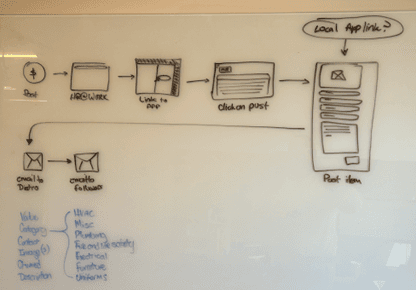
Explored three directions. For the prototype, I modeled both Power Apps and SharePoint-driven solutions.
- WordPress site (too risky for security).
- Power Apps app (fit well but limited by licensing costs).
- Enhanced SharePoint with Microsoft Forms + Power Automate (low-cost, scalable).
-
Wireframing & Prototyping
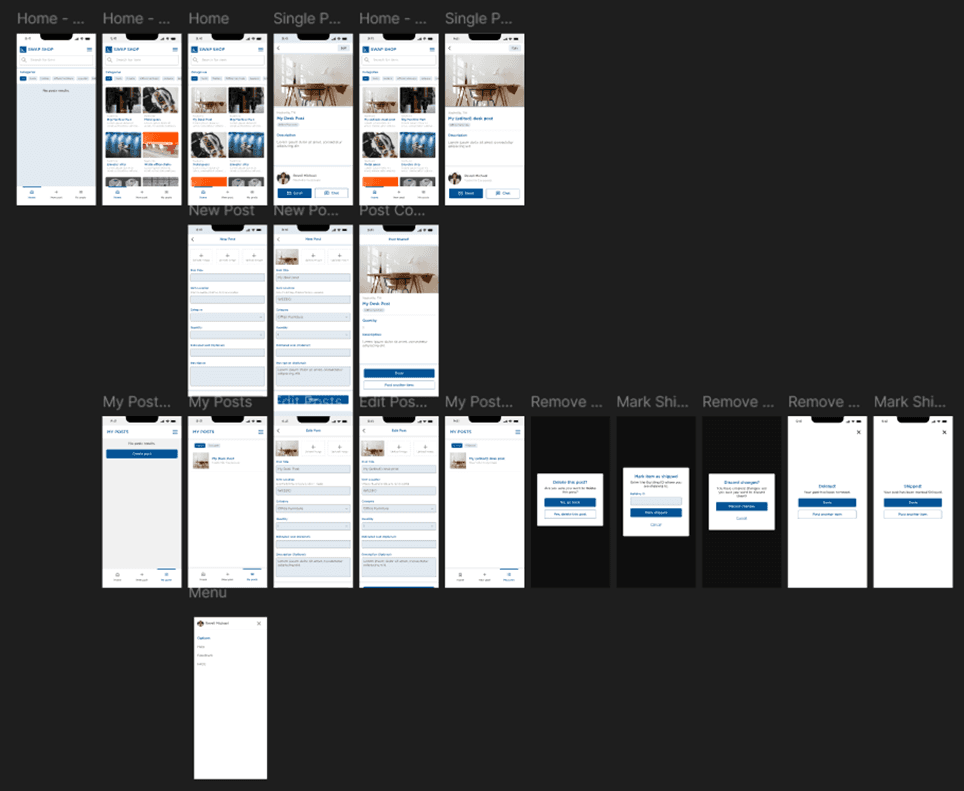
- Created wireframes and high-fidelity prototypes in Figma.
- Designed item listings, search, and submission forms.
- Conducted hallway usability testing with engineers and staff, iterating based on feedback.
-
Testing & Documentation
- Measured adoption preference vs. email (65% improvement).
- Documented workflows and design specs for potential handoff to developers.
A shop, not an inbox.
The prototype featured:
- A centralized shop-style interface for browsing items.
- Search and filters for easy navigation.
- Submission forms for posting new items.
- Visual item previews to reduce miscommunication.


What we've learned.
- Prototyping validates direction — testing revealed a strong appetite for a shop-like exchange system.
- Visual clarity boosts adoption — staff preferred the intuitive shop design over email.
- Existing tools can be maximized — modeling the workflow with SharePoint, Forms, and Teams showed how costs could be minimized.
- Documentation ensures readiness — detailed workflows prepared the concept for future development.
What's next?
While the Swap Shop was not developed, the prototype laid the groundwork for potential future steps:
- Built in Power Apps or enhanced SharePoint for full launch.
- Add notifications and approvals to manage new listings.
- Expand search and analytics features to measure savings and adoption.
The Swap Shop demonstrates how UX research, prototyping, and testing can uncover opportunities for operational efficiency, even without a full build. It highlights my ability to validate concepts, test usability, and create enterprise-ready design documentation.