Virtual Sketch: a production-ready AI chat
Impact overview
A chatbot is a public API with a personality.
Anyone can type anything into a chat box on a public site. I wanted visitors to be able to ask “what does Sketch do?” and get a useful answer, without that box becoming a free model for strangers, a way to leak my data, or a target for prompt injection.
So I treated it as a product with a production checklist, not a demo: explicit pipeline, fixed outputs, fallbacks, limits, logging and tests.
What can go wrong with a public chat.
- Cost and abuse: an open endpoint gets scripted, and hosted models bill per token.
- Prompt injection and jailbreaks: visitors can try to override the instructions or extract them.
- Privacy: people paste emails and phone numbers into chat boxes, and those should never be stored raw.
- Reliability: if the model is slow or down, the visitor should not see a spinner or a stack trace.
- Trust: an AI speaking as me must not invent facts or hand out personal contact details.
Helpful, bounded and boring to operate.
Answer questions about my work accurately, in my voice, on hardware I own. Be read-only by design. Fail gracefully. Make every step testable and every run auditable.
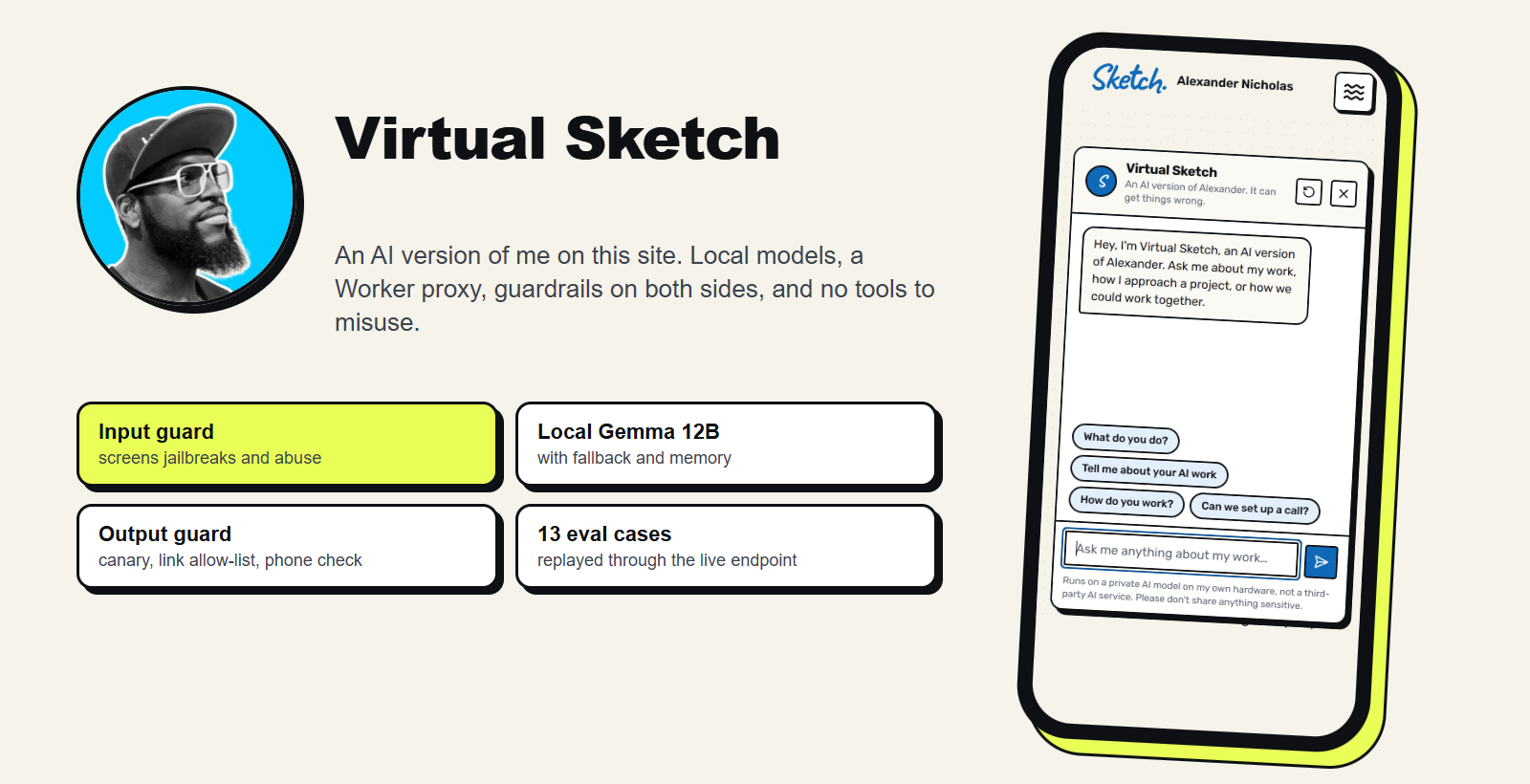
An explicit pipeline, not one big prompt.
- Worker proxy Same-origin check, size cap, per-IP rate limit; adds the secret key
- Validate and mask Input contract, then emails, phone and card numbers are masked
- Limit Redis counters: 30 messages an hour per visitor, 400 a day overall
- Input guard A small local model screens for jailbreaks and unsafe content
- Answer Local Gemma 12B with a fallback model and 6 turns of memory
- Output guard and log Canary, link allow-list, phone check; masked run logged
-
Two layers of access control
The browser only talks to my own domain. A Cloudflare Worker checks the request origin and size, applies a per-IP limit, and forwards to n8n with a secret header that exists only as a Worker secret. A key placed in browser code would be public, so it never goes there. n8n rejects any call without the key.
-
Model routing
A small local model does the cheap guard work and a larger local model writes the answer. If the main model errors, the workflow retries and then falls back to the smaller one. If everything fails, the visitor gets a friendly message with my email and booking link.
-
Read-only by design
The agent has no tools. It cannot send email, query a database or call an API, so even a successful injection has nothing to act with. The only thing it can do is write text.
-
Untrusted input, trusted facts
My profile and the facts the bot may state live in the system prompt. The visitor’s message is fenced and labelled as untrusted. Memory is the last six turns in Postgres, stored masked.
-
Output checks without another model call
A rule-based output guard checks for a planted canary string (a leak of the system prompt), blocks links outside an allow-list, and catches phone-number patterns. Because it is rules, it adds no cost or latency.
-
Logs and evals
Every exchange is written to a data table with latency, outcome and a masked message. A separate eval workflow replays a table of 13 test questions through the live endpoint, grades each reply against an expectation with a local model, adds hard “must not include” checks, and writes pass or fail back to the table. It runs on demand and every Monday.
What it delivers.
- A live assistant on this site that answers in my voice, with every claim drawn from a profile I control.
- No third-party AI sees visitor chats: inference runs on my own hardware, and the privacy policy says so.
- A small, bounded attack surface: key-gated, rate limited, read-only, guarded on both sides and logged.
- Graceful degradation: model outage, rate limit or guard block each produce a clear, friendly reply instead of an error.
What I've learned.
- Constrain the system before you tune the prompt: removing tools and adding limits did more for safety than any instruction.
- Never put a secret in browser code. Put a tiny proxy in front and keep the key server-side.
- Rules beat models for cheap, deterministic checks like links and phone numbers.
- Evals need to run against the real endpoint. A failing run is useful information: if the local model is offline, the fallback reply makes the test fail, which tells me the fallback works and the model needs attention.
What's next?
- Sample real conversations from the log through the judge each week.
- Add a human-verification step (Turnstile) if scripted abuse shows up.
- Publish a sanitized version of the guard-and-limit skeleton as a download.